08 · Learning by Comparison
MoCo
Momentum contrast and the dictionary-as-queue mechanism.
Decoupling the dictionary from the batch
"Contrastive learning is a way of building a discrete dictionary on high-dimensional continuous inputs such as images. The dictionary is dynamic in the sense that the keys are randomly sampled, and that the key encoder evolves during training. Our hypothesis is that good features can be learned by a large dictionary that covers a rich set of negative samples, while the encoder for the dictionary keys is kept as consistent as possible despite its evolution."
He et al. (2020) propose to view contrastive learning as dictionary lookup. An encoded query
From the InfoNCE section, we know that more negatives raise the ceiling on how much mutual information the loss can capture. SimCLR addressed this by using very large batch sizes (up to 8192), but this requires significant GPU memory. MoCo takes a different approach: decouple the dictionary size from the batch size by maintaining a queue of encoded keys from recent mini-batches.
This raises a consistency problem. If the key encoder changes rapidly during training, the oldest keys in the queue were produced by a very different encoder than the newest ones. The dictionary would contain representations that are not comparable to each other. MoCo solves this with a momentum-updated encoder that evolves slowly, keeping the dictionary keys consistent even as they span many training steps.
Contrastive loss as dictionary lookup
Given a query
where
The query and keys are produced by encoder networks. Given an input image
For this dictionary lookup to produce good representations, the authors argue two properties are needed:
- Large. A bigger dictionary samples the underlying visual space more densely, providing harder negatives that force the encoder to learn finer distinctions.
- Consistent. The keys should be produced by the same or a similar encoder so that the query can meaningfully compare against them.
The MoCo mechanism
Dictionary as a queue
The dictionary is maintained as a first-in, first-out (FIFO) queue of size
This decouples the dictionary size from the batch size: the dictionary can be much larger than a typical mini-batch, allowing
The oldest keys are removed because they were encoded by the most outdated version of the key encoder and are therefore the least consistent with the current keys.
Momentum update
Let
- Only
The key encoder parameters are updated as an exponential moving average of the query encoder:
where
The authors find that momentum is critical. Setting
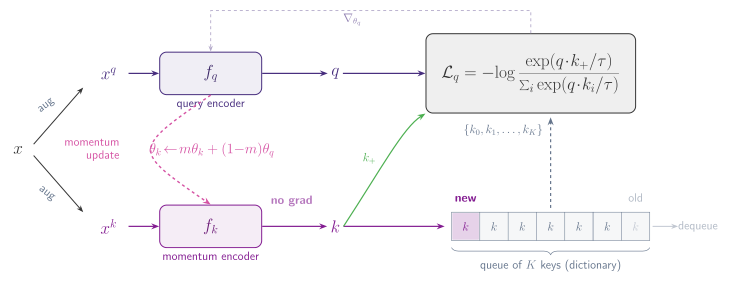
Putting it together
The full training step is compact. For each mini-batch:
- Augment each image twice to obtain a query view and a key view.
- Encode the query view with
- Compute the InfoNCE loss using
- Back-propagate through
- Update the key encoder via momentum:
- Enqueue the current batch of keys; dequeue the oldest batch.
The gradient never flows through the key encoder or the queue. This is what makes the design efficient: the dictionary can hold tens of thousands of keys without any additional memory cost for storing their computation graphs.